What you will build
A workflow may fail even when its routing is correct. A temporary lookup failure should have a limited retry policy, while a programming error should remain visible. We will deliberately fail the first lookup call, then allow the second call to succeed.
This lesson also introduces the outbox: a local table of prepared replies. The demonstration simulates the reviewer’s approval so it can run to completion in one command. It then repeats the queue write and checks that there is still only one row. No email is sent.
By the end: Observe a retry and progress events, then prove that repeating a queue operation does not add another row.
- What you will build
- What you need before starting
- Understand the idea before the code
- The workflow we are building
- Create the lesson folder
- Complete code for this article
- Run it and compare the result
- Walk through what just happened
- Change one thing yourself
- If your result is different
- What you can now explain
What you need before starting
You need basic Python: variables, functions, dictionaries, loops, and imports. When this lesson introduces a class or a library-specific term, its role is explained below.
Use Python 3.12. These examples were executed on Windows with Python 3.12.4. Use the shown interpreter consistently when installing packages and running code.
You do not need to run an earlier article to make this part execute. The complete files and data used here are supplied below. The series order is for learning the ideas progressively.
Understand the idea before the code
| Concept | What it means here | Example |
|---|---|---|
| Retry | Repeat one operation after an expected temporary error. | Try a lookup again after a temporary lookup failure. |
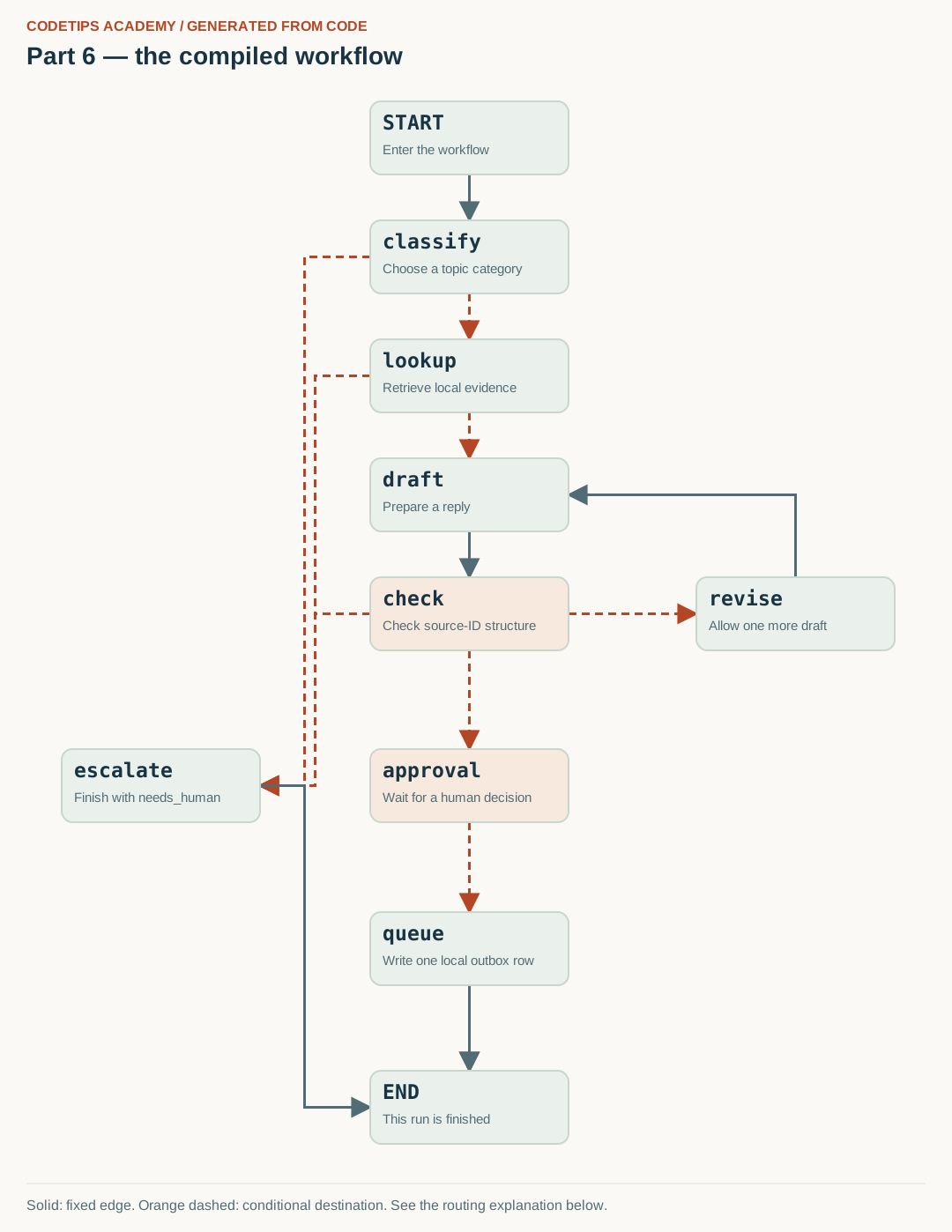
| Revision loop | Follow graph edges to create and check another draft. | check → revise → draft → check. |
| Streaming | Receive progress pieces while the run proceeds. | Print a node's new update as that node finishes. |
| Idempotency | Repeating the same logical operation does not create an extra external effect. | Queue the same ticket once even if that operation is attempted again. |
An exception is Python's way of reporting an error, such as a connection timeout. A retry policy says which errors to retry and how many attempts to allow. Retrying every exception can hide programming bugs. A transient error is one expected to be temporary; a missing required field is usually a validation problem, not something waiting will fix.
A side effect is a change outside the returned Python value: writing a database row or sending a message. Our outbox is a SQLite table of prepared replies. Queuing means inserting a row into that local table. It does not send email. The queue operation is protected by a unique ticket identifier so repetition does not create duplicate queued replies.
Do not call this a guarantee of exactly-once email delivery. If you later connect a real mail service, its delivery and deduplication behavior need separate design. The lab demonstrates one durable local queue record.
The workflow we are building

The boxes are named Python operations. Solid arrows are fixed transitions; dashed arrows show possible destinations chosen by routing functions. The image comes from this lesson's actual compiled graph. One particular input follows only the applicable route. Open the full-size graph.
Create the lesson folder
Create this folder and keep the filenames exactly as shown. In particular, a local module is an ordinary file beside the program, not an extra package you must guess how to install.
lesson-folder/
  lesson.py
  graph_picture.py
  requirements.txt
Save requirements.txt
These are the external Python packages for this lesson. The local files above are included in the article; they are not pip packages.
langgraph==1.2.16
langgraph-checkpoint-sqlite==3.1.2
python -m venv .venv
.venv\Scripts\python.exe -m pip install -r requirements.txt
On Linux/macOS, use python3 -m venv .venv and .venv/bin/python -m pip install -r requirements.txt. Installation requires internet access. The default examples do not call a paid API.
Complete code for this article
Save this complete file as lesson.py
This is the complete program, including imports, data, function definitions, and the entry point.
from graph_picture import save_graph
from operator import add
from typing import Annotated, Literal, TypedDict

Category = Literal["setup", "hardware", "billing", "other"]


class Evidence(TypedDict):
    id: str
    title: str
    text: str


class TicketState(TypedDict, total=False):
    ticket_id: str
    text: str
    category: Category
    evidence: list[Evidence]
    reply: str
    citations: list[str]
    attempts: int
    checks_ok: bool
    approved: bool
    outcome: str
    llm_used: bool
    events: Annotated[list[str], add]


def initial_state(ticket_id: str, text: str) -> TicketState:
    if not ticket_id or len(ticket_id) > 80:
        raise ValueError("Choose a ticket ID containing 1 to 80 characters.")
    if not text.strip() or len(text) > 4000:
        raise ValueError("Ticket text must contain 1 to 4,000 characters.")
    return {
        "ticket_id": ticket_id,
        "text": text.strip(),
        "attempts": 0,
        "events": [],
        "approved": False,
        "llm_used": False,
    }


KNOWLEDGE = [
    {
        "id": "D1",
        "category": "setup",
        "title": "Create an isolated Python environment",
        "keywords": ["venv", "virtual", "environment", "activate", "python"],
        "text": "Create a virtual environment with python -m venv .venv. Use the Python executable inside .venv when installing and running this project.",
    },
    {
        "id": "D2",
        "category": "setup",
        "title": "Install into the correct interpreter",
        "keywords": [
            "pip",
            "install",
            "module",
            "import",
            "modulenotfounderror",
            "package",
        ],
        "text": "Check python -m pip --version to identify the interpreter used for package installation. Install the required package with that same interpreter.",
    },
    {
        "id": "D3",
        "category": "hardware",
        "title": "Investigate an unavailable serial port",
        "keywords": ["esp32", "port", "serial", "usb", "cable", "board"],
        "text": "For this fictional workshop, first identify the exact board and its vendor instructions. Check that the USB cable supports data, the expected device appears in your operating system, and the selected port matches it. Disconnect power before changing wiring.",
    },
]
import json
import re


def tokens(text: str) -> set[str]:
    return set(re.findall("[a-z0-9]+", text.lower()))


def classify_rules(text: str) -> str:
    words = tokens(text)
    if words & {"refund", "payment", "invoice", "charge", "billing"}:
        return "billing"
    if words & {"esp32", "port", "serial", "usb", "board", "camera"}:
        return "hardware"
    if words & {"python", "pip", "venv", "install", "module", "import", "environment"}:
        return "setup"
    return "other"


def retrieve(text: str, category: str) -> list[dict]:
    corpus = KNOWLEDGE
    words = tokens(text)
    scored = [
        (len(words & set(doc["keywords"])), doc)
        for doc in corpus
        if doc["category"] == category
    ]
    scored.sort(key=lambda pair: (-pair[0], pair[1]["id"]))
    return [
        {key: doc[key] for key in ("id", "title", "text")}
        for score, doc in scored
        if score > 0
    ][:2]


import re


def draft_demo(state: dict) -> dict:
    evidence = state.get("evidence", [])
    if not evidence:
        return {
            "reply": "A workshop mentor needs to review this question.",
            "citations": [],
            "llm_used": False,
        }
    doc = evidence[0]
    return {
        "reply": f'Try this documented starting point: {doc['text']} [{doc['id']}]',
        "citations": [doc["id"]],
        "llm_used": False,
    }


def citation_checks(state: dict) -> bool:
    """Check IDs and markers. This does NOT verify factual entailment."""
    citations = state.get("citations", [])
    reply = state.get("reply", "")
    allowed = {doc["id"] for doc in state.get("evidence", [])}
    if not citations or not reply.strip():
        return False
    if len(citations) != len(set(citations)):
        return False
    markers = set(re.findall("\\[(D[0-9]+)\\]", reply))
    return set(citations) <= allowed and markers == set(citations)


import json
from contextlib import closing
import sqlite3
from pathlib import Path


class Outbox:
    """Local queue only. There is deliberately no email-sending code."""

    def __init__(self, path: Path):
        self.path = Path(path)
        self.path.parent.mkdir(parents=True, exist_ok=True)
        with closing(sqlite3.connect(self.path)) as conn, conn:
            conn.execute(
                "CREATE TABLE IF NOT EXISTS outbox (\n                ticket_id TEXT PRIMARY KEY, reply TEXT NOT NULL,\n                citations TEXT NOT NULL)"
            )

    def put(self, ticket_id: str, reply: str, citations: list[str]) -> None:
        encoded = json.dumps(citations, sort_keys=True)
        with closing(sqlite3.connect(self.path)) as conn, conn:
            conn.execute(
                "INSERT OR IGNORE INTO outbox VALUES (?, ?, ?)",
                (ticket_id, reply, encoded),
            )
            existing = conn.execute(
                "SELECT reply, citations FROM outbox WHERE ticket_id = ?", (ticket_id,)
            ).fetchone()
            if existing != (reply, encoded):
                raise ValueError("Ticket ID already has a different queued reply.")

    def rows(self) -> list[dict]:
        with closing(sqlite3.connect(self.path)) as conn, conn:
            rows = conn.execute(
                "SELECT ticket_id, reply, citations FROM outbox ORDER BY ticket_id"
            ).fetchall()
        return [
            {"ticket_id": row[0], "reply": row[1], "citations": json.loads(row[2])}
            for row in rows
        ]


class ModelError(RuntimeError):
    pass


from langgraph.graph import END, START, StateGraph
from langgraph.types import RetryPolicy, interrupt


def build_graph(checkpointer, outbox, drafter=draft_demo, retriever=retrieve):
    def classify(state):
        category = classify_rules(state["text"])
        return {"category": category, "events": [f"classify:{category}"]}

    def after_classify(state):
        return "lookup" if state["category"] in {"setup", "hardware"} else "escalate"

    def lookup(state):
        evidence = retriever(state["text"], state["category"])
        return {"evidence": evidence, "events": [f"lookup:{len(evidence)}"]}

    def after_lookup(state):
        return "draft" if state["evidence"] else "escalate"

    def draft(state):
        try:
            result = drafter(state)
        except ModelError:
            result = {"reply": "", "citations": [], "llm_used": False}
        return {**result, "events": ["draft"]}

    def check(state):
        ok = citation_checks(state)
        return {"checks_ok": ok, "events": [f"check:{ok}"]}

    def after_check(state):
        if state["checks_ok"]:
            return "approval"
        return "revise" if state["attempts"] < 1 else "escalate"

    def revise(state):
        return {
            "attempts": state["attempts"] + 1,
            "events": ["revise:one-more-attempt"],
        }

    def approval(state):
        decision = interrupt(
            {
                "ticket_id": state["ticket_id"],
                "reply": state["reply"],
                "evidence": state["evidence"],
                "citations": state["citations"],
                "notice": "Approval queues a local reply. No email is sent.",
            }
        )
        if not isinstance(decision, dict) or type(decision.get("approve")) is not bool:
            raise ValueError(
                "Resume with a dictionary containing a boolean approve field."
            )
        approved = decision["approve"]
        return {
            "approved": approved,
            "outcome": "approved" if approved else "rejected",
            "events": [f"approval:{approved}"],
        }

    def after_approval(state):
        return "queue" if state["approved"] else END

    def queue(state):
        outbox.put(state["ticket_id"], state["reply"], state["citations"])
        return {"outcome": "queued", "events": ["queue:local-only"]}

    def escalate(state):
        return {"outcome": "needs_human", "events": ["escalate"]}

    builder = StateGraph(TicketState)
    builder.add_node("classify", classify)
    builder.add_node(
        "lookup",
        lookup,
        retry_policy=RetryPolicy(
            max_attempts=3,
            initial_interval=0.01,
            jitter=False,
            retry_on=ConnectionError,
        ),
    )
    builder.add_node("draft", draft)
    builder.add_node("check", check)
    builder.add_node("revise", revise)
    builder.add_node("approval", approval)
    builder.add_node("queue", queue)
    builder.add_node("escalate", escalate)
    builder.add_edge(START, "classify")
    builder.add_conditional_edges("classify", after_classify, ["lookup", "escalate"])
    builder.add_conditional_edges("lookup", after_lookup, ["draft", "escalate"])
    builder.add_edge("draft", "check")
    builder.add_conditional_edges(
        "check", after_check, ["approval", "revise", "escalate"]
    )
    builder.add_edge("revise", "draft")
    builder.add_conditional_edges("approval", after_approval, ["queue", END])
    builder.add_edge("queue", END)
    builder.add_edge("escalate", END)
    compiled = builder.compile(checkpointer=checkpointer)
    save_graph(compiled, 6)
    return compiled


"Article 6: demonstrate one transient failure, streaming and an idempotent outbox."
import json
import tempfile
from pathlib import Path
from langgraph.checkpoint.memory import InMemorySaver
from langgraph.types import Command


def main():
    calls = 0

    def flaky_lookup(text, category):
        nonlocal calls
        calls += 1
        if calls == 1:
            raise ConnectionError("Simulated temporary lookup failure")
        return retrieve(text, category)

    with tempfile.TemporaryDirectory() as folder:
        outbox = Outbox(Path(folder) / "outbox.sqlite")
        graph = build_graph(InMemorySaver(), outbox, retriever=flaky_lookup)
        config = {"configurable": {"thread_id": "lesson-6"}}
        for update in graph.stream(
            initial_state("lesson-6", "My pip install fails"),
            config,
            stream_mode="updates",
        ):
            print("STEP:", ", ".join(update))
        print("lookup_calls:", calls)
        graph.invoke(Command(resume={"approve": True}), config)
        row = outbox.rows()[0]
        outbox.put(row["ticket_id"], row["reply"], row["citations"])
        print(
            json.dumps(
                {
                    "outbox_rows_after_repeat": len(outbox.rows()),
                    "outcome": graph.get_state(config).values["outcome"],
                },
                indent=2,
            )
        )


if __name__ == "__main__":
    main()
Save this complete file as graph_picture.py
This is the complete local diagram renderer imported by lesson.py. Save it in the same folder. It draws the compiled graph; it does not decide the workflow or contact an image service.
import html
from pathlib import Path

ROLES = {
    "__start__": "Enter the workflow",
    "__end__": "This run is finished",
    "clean": "Normalize the question",
    "draft": "Prepare a reply",
    "classify": "Choose a topic category",
    "technical": "Technical branch",
    "human": "Ask a mentor to review",
    "lookup": "Retrieve local evidence",
    "check": "Check source-ID structure",
    "revise": "Allow one more draft",
    "review": "Pause inside this node",
    "approval": "Wait for a human decision",
    "queue": "Write one local outbox row",
    "escalate": "Finish with needs_human",
}


def positions(part):
    if part == 2:
        return {
            "__start__": (320, 115),
            "clean": (320, 250),
            "draft": (320, 385),
            "__end__": (320, 520),
        }
    if part == 3:
        return {
            "__start__": (420, 115),
            "classify": (420, 250),
            "human": (120, 410),
            "technical": (720, 410),
            "__end__": (420, 590),
        }
    if part == 5:
        return {"__start__": (320, 115), "review": (320, 265), "__end__": (320, 415)}
    return {
        "__start__": (420, 115),
        "classify": (420, 250),
        "lookup": (420, 385),
        "draft": (420, 520),
        "check": (420, 655),
        "revise": (790, 655),
        "human": (70, 850),
        "escalate": (70, 850),
        "approval": (420, 850),
        "queue": (420, 1035),
        "__end__": (420, 1215),
    }


def draw_svg(structure, part):
    layout = positions(part)
    node_width, node_height = (225, 83)
    width = 850 if part in {2, 5} else 1080
    height = max((layout[name][1] for name in structure.nodes)) + node_height + 100
    chunks = [
        f'<svg xmlns="http://www.w3.org/2000/svg" width="{width}" height="{height}" viewBox="0 0 {width} {height}" role="img" aria-labelledby="title desc">',
        f'<title id="title">Part {part}: graph generated from the compiled lesson code</title>',
        '<desc id="desc">Solid arrows are fixed edges. Dashed arrows are conditional destinations. Node positions are chosen for readability.</desc>',
        '<defs><marker id="solid" viewBox="0 0 10 10" refX="9" refY="5" markerWidth="8" markerHeight="8" orient="auto"><path d="M0 0 L10 5 L0 10z" fill="#526c75"/></marker><marker id="conditional" viewBox="0 0 10 10" refX="9" refY="5" markerWidth="8" markerHeight="8" orient="auto"><path d="M0 0 L10 5 L0 10z" fill="#b54625"/></marker></defs>',
        '<rect width="100%" height="100%" fill="#faf9f5"/>',
        '<text x="30" y="35" font-family="Arial,sans-serif" font-size="16" font-weight="bold" fill="#b54625">CODETIPS ACADEMY / GENERATED FROM CODE</text>',
        f'<text x="30" y="73" font-family="Arial,sans-serif" font-size="28" font-weight="bold" fill="#183443">Part {part} — the compiled workflow</text>',
    ]
    edge_data = []
    for index, edge in enumerate(structure.edges):
        sx, sy = layout[edge.source]
        tx, ty = layout[edge.target]
        if sx == tx:
            points = [
                (sx + node_width / 2, sy + node_height),
                (tx + node_width / 2, ty),
            ]
        elif ty < sy:
            points = [
                (sx + node_width / 2, sy),
                (sx + node_width / 2, ty + node_height / 2),
                (tx + node_width, ty + node_height / 2),
            ]
        else:
            leftward = tx < sx
            x1 = sx if leftward else sx + node_width
            x2 = tx + node_width if leftward else tx
            y1 = sy + node_height / 2
            y2 = ty + node_height / 2
            middle = (x1 + x2) / 2 + (index % 3 - 1) * 12
            points = [(x1, y1), (middle, y1), (middle, y2), (x2, y2)]
        kind = "conditional" if edge.conditional else "solid"
        color = "#b54625" if edge.conditional else "#526c75"
        dash = ' stroke-dasharray="9 6"' if edge.conditional else ""
        chunks.append(
            '<polyline points="'
            + " ".join((f"{x:g},{y:g}" for x, y in points))
            + f'" fill="none" stroke="{color}" stroke-width="3"{dash} marker-end="url(#{kind})"/>'
        )
        edge_data.append(
            {
                "source": edge.source,
                "target": edge.target,
                "conditional": bool(edge.conditional),
            }
        )
    for name in structure.nodes:
        x, y = layout[name]
        display = {"__start__": "START", "__end__": "END"}.get(name, name)
        highlight = name in {"review", "approval", "check"}
        chunks.append(
            f'<rect x="{x}" y="{y}" width="{node_width}" height="{node_height}" rx="12" fill="{('#f8e9df' if highlight else '#eaf0eb')}" stroke="#c9d6ce" stroke-width="2"/>'
        )
        chunks.append(
            f'<text x="{x + 14}" y="{y + 32}" font-family="Consolas,monospace" font-size="23" font-weight="bold" fill="#183443">{html.escape(display)}</text>'
        )
        chunks.append(
            f'<text x="{x + 14}" y="{y + 60}" font-family="Arial,sans-serif" font-size="15" fill="#526c75">{html.escape(ROLES.get(name, name))}</text>'
        )
    chunks += [
        f'<path d="M30 {height - 55} H{width - 30}" stroke="#d9dfd8"/>',
        f'<text x="30" y="{height - 25}" font-family="Arial,sans-serif" font-size="16" fill="#526c75">Solid: fixed edge. Orange dashed: conditional destination. See the routing explanation below.</text>',
        "</svg>",
    ]
    return (
        "\n".join(chunks),
        {"part": part, "nodes": list(structure.nodes), "edges": edge_data},
    )


def save_graph(graph, part):
    structure = graph.get_graph()
    svg, _ = draw_svg(structure, part)
    Path("workflow.svg").write_text(svg, encoding="utf-8")
    Path("workflow.mmd").write_text(structure.draw_mermaid(), encoding="utf-8")
Run it and compare the result
Run commands from the lesson folder. In the commands below, python means the environment you installed into. On Windows, substitute .venv\Scripts\python.exe; on Linux/macOS substitute .venv/bin/python. Do not create the environment with one interpreter and run the lesson with another.
Run 1: python lesson.py
python lesson.py
Captured standard output:
STEP: classify
STEP: lookup
STEP: draft
STEP: check
STEP: __interrupt__
lookup_calls: 2
{
  "outbox_rows_after_repeat": 1,
  "outcome": "queued"
}
The program also writes workflow.svg and workflow.mmd into the current folder. Open the SVG in a browser. The Mermaid file is a text representation of the same nodes and edges.
The displayed output was captured from the supplied default program in a separate folder, with no project-level module on its import path. It is a reproducible demonstration on these examples, not a claim about arbitrary inputs.
This demonstration uses a temporary outbox folder; it is removed when the program finishes. Part 8 shows the persistent command-line version.
Walk through what just happened
1. Observe the simulated failure
flaky_lookup raises ConnectionError once and then delegates to retrieve. RetryPolicy is attached only to lookup and only to the intended error type. The printed lookup_calls value lets you distinguish a retry from an extra graph revision.
2. Read progress as node updates
stream with updates yields node updates as the graph proceeds. STEP lines name completed operations. They are not necessarily full-state dumps, and they are not the model’s internal reasoning.
3. Put the side effect after approval
The approval node pauses before queue. The example supplies a Boolean decision with Command and then resumes. A real application must obtain that decision from an authorized reviewer; the final CLI separates those actions.
4. Enforce idempotency in SQLite
Outbox uses ticket_id as a primary key. Repeating the same ID and identical reply is harmless; a conflicting reply is rejected. This protects the local queue record, not a hypothetical downstream email service.
Change one thing yourself
Change the simulated lookup to raise ValueError instead of ConnectionError. It should fail rather than silently retrying an error outside the policy. Restore the intended exception afterward.
If your result is different
A ConnectionError after all allowed attempts is an expected failure path. An outbox conflict means the same ticket ID was reused with different content; do not bypass the check by dropping the primary key.
Check the complete imports and filenames first. Then compare your input and command with the shown run. Numeric results may differ slightly between platforms; the program's assertions check the intended relationships rather than relying on a decorative screenshot.
What you can now explain
Observe a retry and progress events, then prove that repeating a queue operation does not add another row. Next we will optionally replace the drafting function with a local language-model request.
Technical reference: LangGraph Graph API. This project and its wording are original CodeTips Academy material.