Part 4 of 8 · Basic Python is enough · Tested with Python 3.12.4, LangGraph 1.2.16 and SQLite checkpointer 3.1.2.
Find relevant local notes, attach source references to a reply, and stop a failed revision loop after a deliberate limit.
Replace a generic suggestion with a documented starting point
Our classifier knows which technical branch to use. Now the tool needs actual information to quote or summarize. We will add three short, fictional workshop notes about Python environments, package installation, and an unavailable serial port.
The notes are in src/support_desk/data/knowledge.json. Each has a stable ID, category, title, search keywords, and text. The ID lets the application refer to a particular note without treating a document title as a unique database key.
We will retrieve notes using simple word overlap. You do not need embeddings, a vector database, or an LLM account to understand the retrieval step. This is our own small baseline, and it has clearly observable limits.
Run:
python lessons/04_retrieval/main.py
Give retrieval a concrete contract
The function receives ticket text and its category. It returns a list of evidence dictionaries. A missing result is an empty list, not a fabricated answer.
def retrieve(text: str, category: str) -> list[dict]:
    corpus = json.loads(files("support_desk").joinpath("data/knowledge.json").read_text(encoding="utf-8"))
    words = tokens(text)
    scored = [(len(words & set(doc["keywords"])), doc) for doc in corpus
              if doc["category"] == category]
    scored.sort(key=lambda pair: (-pair[0], pair[1]["id"]))
    return [{key: doc[key] for key in ("id", "title", "text")}
            for score, doc in scored if score > 0][:2]
importlib.resources.files locates data packaged with our Python module. It avoids assuming that the terminal's current directory contains the knowledge JSON. We still run lesson commands from the repository root so the example paths are consistent.
For each document in the right category, we count shared words between the ticket and its keyword list. We sort the largest counts first. Sorting by document ID breaks equal-score ties consistently. Finally, we take at most two documents and return only the fields the drafting step needs.
This score is a word-overlap count. It is not a probability, semantic similarity measurement, or estimate of answer quality. For “My pip install has a missing module,” the installation note matches several terms and appears first. “The camera image is purple” is classified as hardware, but none of our hardware note's search keywords match. The correct behavior for this tiny corpus is to request human help.
Keep source IDs with the reply
The demo drafting function chooses the first retrieved document and copies its guidance into a fixed sentence. Its output also records the document ID separately:
def draft_demo(state: dict) -> dict:
    evidence = state.get("evidence", [])
    if not evidence:
        return {"reply": "A workshop mentor needs to review this question.",
                "citations": [], "llm_used": False}
    doc = evidence[0]
    return {"reply": f"Try this documented starting point: {doc['text']} [{doc['id']}]",
            "citations": [doc["id"]], "llm_used": False}
A result might contain citations: ["D2"] and end its reply with [D2]. Keeping a machine-readable list makes checks simpler than attempting to discover every reference by reading prose later.
This version does not generate new wording through a model. It is an evidence-backed template. That makes failures in routing, retrieval, and graph control easier to observe before we introduce uncertain text generation.
Check what can actually be checked
Our citation_checks function verifies that a reply is nonempty, every cited ID exists in the retrieved evidence, citations are not duplicated, and the IDs in visible markers match the citation list.
Those checks do not prove that the sentence follows from the evidence. “The moon is made of cheese [D2]” could pass a source-ID check if D2 was retrieved and listed. That is why the later human-review screen includes the actual evidence text. A structural check is useful, but its name and documentation should not claim semantic verification.
Open src/support_desk/drafting.py and read the function's docstring. Later tests include an intentionally unrelated claim with a valid ID to demonstrate this limitation explicitly.
Add a loop with a stop rule
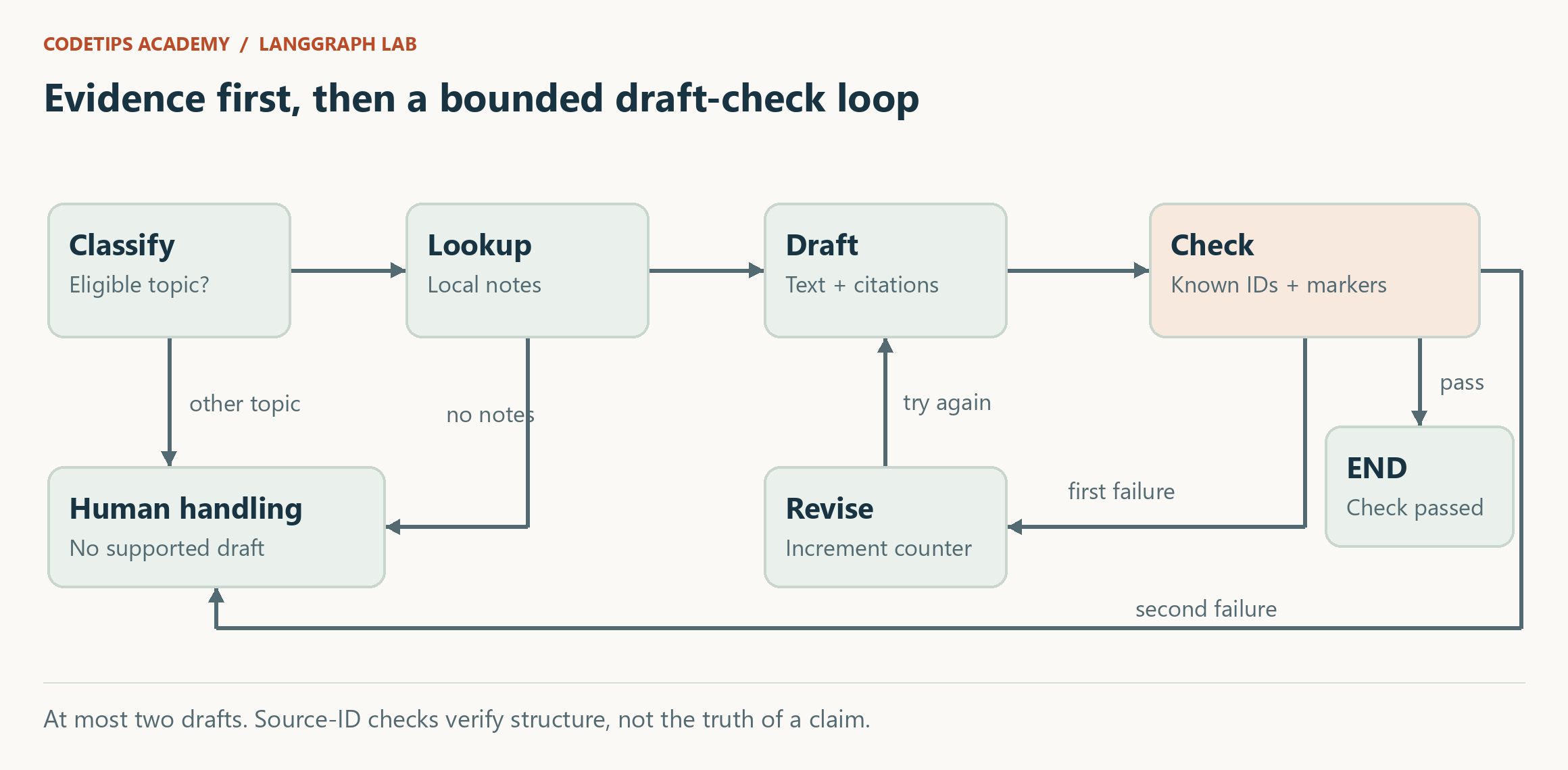
The lesson's after_check function makes the stop rule visible:
def after_check(state):
    if state["checks_ok"]:
        return END
    return "revise" if state["attempts"] < 1 else "human"

def revise(state):
    return {"attempts": state["attempts"] + 1}
We start at zero attempts. On the first failed check, revise changes that counter to one and sends execution back to draft. A second failure goes to the human branch. There are at most two draft calls: the original attempt and one additional attempt.
This is a business limit we chose. It is separate from LangGraph's execution-step limit, which can also stop runaway graphs. You should be able to explain the intended number of attempts without depending on an emergency limit. The graph API exposes conditional transitions and execution limits. Graph API reference guide
In this edition, revision simply repeats the same drafting function. It does not improve retrieval or guarantee a better answer. It gives us a controlled place to demonstrate bounded retries of an invalid draft; a future extension could use explicit feedback. Do not describe the counter as self-correction by itself.
Inspect a successful run
The lesson input mentions pip, install, and module. The state should show category setup, evidence including D2, a reply ending in [D2], and checks_ok set to true. No second drafting attempt is necessary, so attempts remains zero.
The lesson ends after the structural check succeeds. It still does not send a reply or obtain approval. The final project's graph inserts the approval step at this point; that comes next in the series.
Make the loop fail deliberately
The lesson's build function accepts a drafting function argument. In a Python session, load the lesson module or copy a small test around it and pass a function that always returns an unknown citation:
def bad_drafter(state):
    return {"reply": "Unsupported advice [D999]", "citations": ["D999"]}
Predict the trace: draft, failed check, revise, draft, failed check, human. The final tests automate this scenario and assert that drafting occurred exactly twice. We do not leave an infinite loop for the learner to discover accidentally.
For a retrieval exercise, add a fourth fictional note and one corresponding ticket. Record what you expect the top document to be, then verify it. If your new keywords cause a previous ticket to select a different note, you have found a regression worth testing.
We now have a useful draft with traceable references. Next, we will pause for a human decision and preserve that pause after the program exits.
Generate and explain the graph built by this code
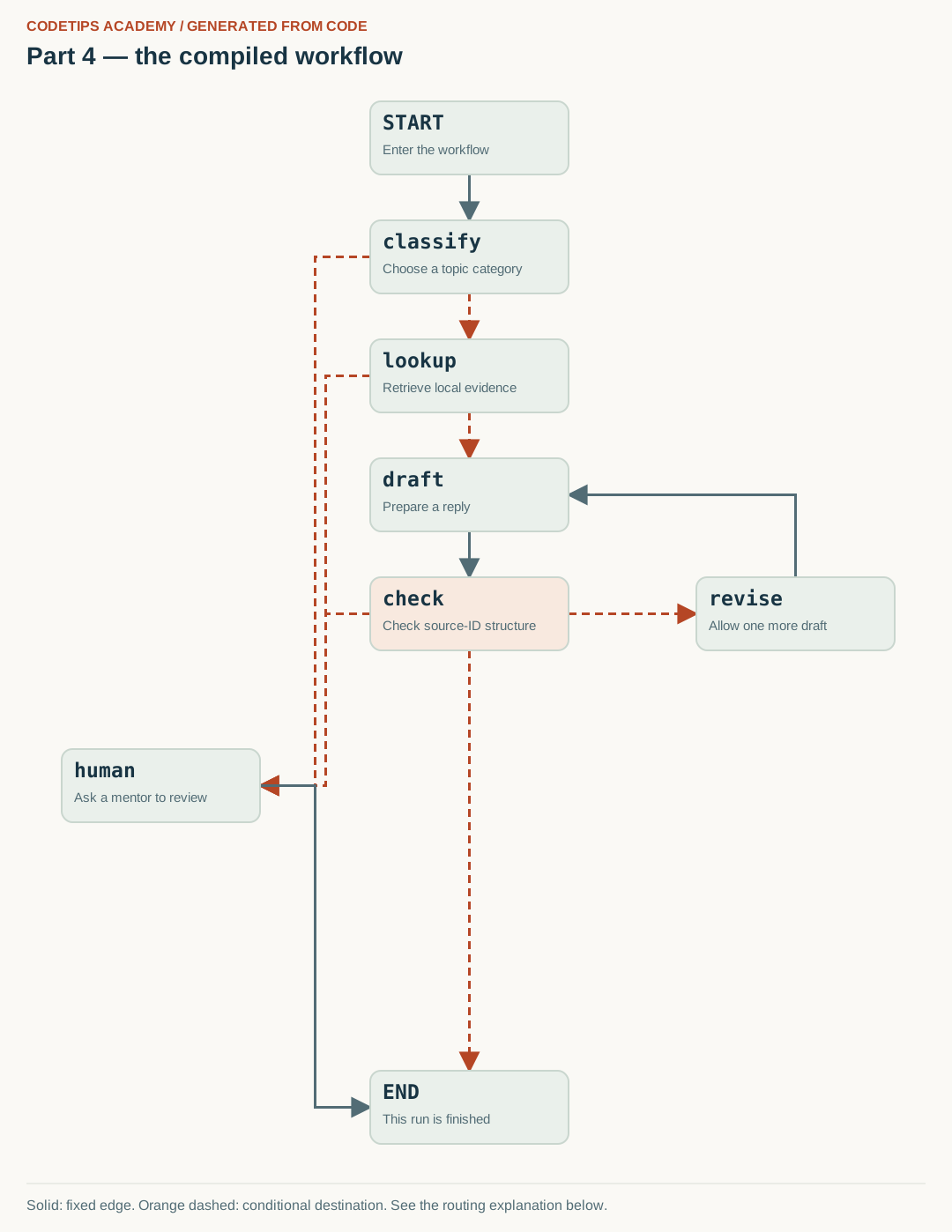
The diagram below is generated from this lesson's compiled get_graph() nodes and edges. Node positions are chosen for readability; the connections come from the Python graph, rather than being copied from a generic illustration.
The following excerpt is inside the complete builder function. Node functions are defined earlier in the linked source file; run the lesson or final package rather than pasting this excerpt by itself.
builder = StateGraph(TicketState)
for name, fn in [("classify", classify), ("lookup", lookup), ("draft", drafter),
                 ("check", check), ("revise", revise), ("human", human)]:
    builder.add_node(name, fn)
builder.add_edge(START, "classify")
builder.add_conditional_edges("classify", route, ["lookup", "human"])
builder.add_conditional_edges("lookup", after_lookup, ["draft", "human"])
builder.add_edge("draft", "check")
builder.add_conditional_edges("check", after_check, [END, "revise", "human"])
builder.add_edge("revise", "draft")
builder.add_edge("human", END)
return builder.compile()
After installing the project, run this command from its root:
python tools/render_graphs.py --part 4
It writes assets/generated/part-04.svg (the image), .mmd (Mermaid source), and .json (the captured nodes and edges). Rendering is local and does not call a model or a remote image service. If you add nodes, update the layout positions in the renderer as well.

Read the arrows with the code
- classify and lookup: Unsupported categories or an empty evidence list go to human handling.
- draft → check: The drafter prepares text and IDs; check validates their structure.
- check → revise → draft: The first failed check allows one more draft. A second failed check goes to human, while a passing check finishes at END. This part does not have approval yet.
Solid lines are fixed transitions. Orange dashed lines mark possible conditional destinations; the routing function chooses the destination for a particular run. A node can contain several Python operations that are not separate graph nodes.
This is an educational project using fictional workshop notes and synthetic tickets. It does not access the real CodeTips Academy website or send email. Downloadable code is provided above. GitHub source links will be added after the repository is published.