
Download the matching self-contained notebook · Read the notebook preview
What you will build
Our earlier router predicts one class. Here we use a tiny language model that predicts the next token. We first train it on three generic sentences, then teach three instruction/answer pairs. The model is a small GRU, not a downloaded transformer.
The complete file includes the vocabulary, embedding, recurrent layer, loss mask, training loops, and generation loop. It is small enough to inspect on CPU. Repeating these three training answers demonstrates the mechanism, not general instruction-following ability.
By the end: Pretrain a tiny sequence model and fine-tune it on answer tokens.
- What you will build
- What you need before starting
- Understand the idea before the code
- A picture of this part's idea
- Create the lesson folder
- Complete code for this article
- Run it and compare the result
- Walk through what just happened
- Change one thing yourself
- If your result is different
- What you can now explain
What you need before starting
You need basic Python: variables, functions, dictionaries, loops, and imports. When this lesson introduces a class or a library-specific term, its role is explained below.
Use Python 3.12. These examples were executed on Windows with Python 3.12.4. Use the shown interpreter consistently when installing packages and running code. This is an original small CPU teaching experiment, not a downloaded general-purpose LLM.
You do not need to run an earlier article to make this part execute. The complete files and data used here are supplied below. The series order is for learning the ideas progressively.
Understand the idea before the code
Supervised fine-tuning (SFT) means further training using examples with desired outputs. It describes the learning objective, while full tuning or LoRA describes which parameters change. You can use the same SFT objective with either parameter-update method.
For this lesson, a token is one word from our tiny vocabulary plus special markers. A token ID is the integer assigned to it. A pretrained LLM often uses subword tokens instead; do not assume every real token is a whole word. An embedding layer looks up a learned vector for each token ID.
A language model predicts token probabilities based on preceding context. Autoregressive generation repeatedly predicts a next token, appends it to the context, then predicts another. The end-of-sequence token, written <eos> here, means stop producing the answer. A padding token fills unused positions when examples of different lengths share a batch.
The toy model uses a GRU (gated recurrent unit), a neural layer that updates an internal vector while processing a sequence. That internal vector is sometimes called its hidden state; it is a numeric tensor, not the dictionary workflow state used by LangGraph. A transformer is another sequence-model architecture using attention. We use a small GRU to make the CPU experiment manageable, not to reproduce a pretrained transformer.
A picture of this part's idea
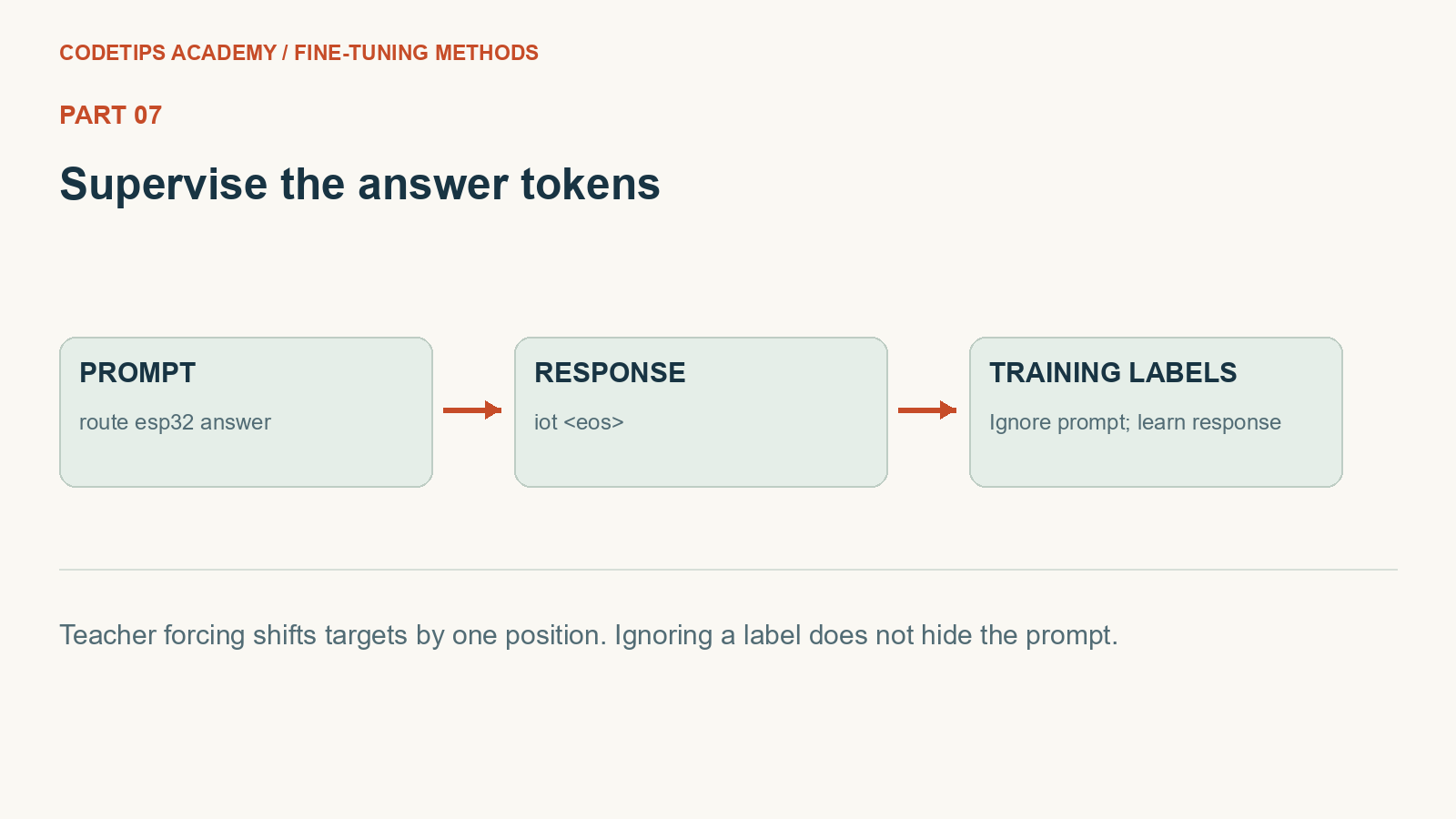
This picture introduces the mechanism. The numbers and assertions in the program below are the actual experiment.
Create the lesson folder
Create this folder and keep the filenames exactly as shown. In particular, a local module is an ordinary file beside the program, not an extra package you must guess how to install.
lesson-folder/
  lesson.py
  requirements.txt
Save requirements.txt
These are the external Python packages for this lesson. The local files above are included in the article; they are not pip packages.
torch==2.2.2
numpy==1.26.4
matplotlib==3.9.1
python -m venv .venv
.venv\Scripts\python.exe -m pip install -r requirements.txt
On Linux/macOS, use python3 -m venv .venv and .venv/bin/python -m pip install -r requirements.txt. Installation requires internet access. The default examples do not call a paid API.
Complete code for this article
Save this complete file as lesson.py
This is the complete program, including imports, data, function definitions, and the entry point.
import torch
from torch import nn
from torch.nn import functional as F


def seed(value=42):
    torch.manual_seed(value)
    torch.set_num_threads(1)


class TinyLM(nn.Module):
    def __init__(self, size):
        super().__init__()
        self.embedding = nn.Embedding(size, 24)
        self.rnn = nn.GRU(24, 32, batch_first=True)
        self.output = nn.Linear(32, size)

    def forward(self, ids):
        h, _ = self.rnn(self.embedding(ids))
        return self.output(h)


def language_setup():
    seed()
    source = ["python means code", "linux means shell", "esp32 means device"]
    pairs = [
        ("route python", "python"),
        ("route linux", "linux"),
        ("route esp32", "iot"),
    ]
    words = sorted(
        set(" ".join(source + [p + " answer " + a for p, a in pairs]).split())
    )
    vocab = {w: i + 2 for i, w in enumerate(words)}
    vocab["<pad>"] = 0
    vocab["<eos>"] = 1
    model = TinyLM(len(vocab))
    opt = torch.optim.Adam(model.parameters(), lr=0.02)
    for _ in range(60):
        for line in source:
            ids = torch.tensor([[vocab[w] for w in line.split()] + [1]])
            loss = F.cross_entropy(
                model(ids[:, :-1]).reshape(-1, len(vocab)), ids[:, 1:].reshape(-1)
            )
            opt.zero_grad()
            loss.backward()
            opt.step()
    return (model, vocab, pairs)


def sft_example(prompt, answer, vocab):
    prefix = [vocab[w] for w in (prompt + " answer").split()]
    completion = [vocab[w] for w in answer.split()] + [vocab["<eos>"]]
    ids = torch.tensor([prefix + completion])
    labels = ids[:, 1:].clone()
    labels[:, : len(prefix) - 1] = -100
    return (ids[:, :-1], labels)


def sft_train(model, vocab, pairs, epochs=45):
    opt = torch.optim.Adam(model.parameters(), lr=0.01)
    history = []
    for _ in range(epochs):
        losses = []
        for prompt, answer in pairs:
            x, y = sft_example(prompt, answer, vocab)
            loss = F.cross_entropy(
                model(x).reshape(-1, len(vocab)), y.reshape(-1), ignore_index=-100
            )
            opt.zero_grad()
            loss.backward()
            opt.step()
            losses.append(float(loss.detach()))
        history.append(sum(losses) / len(losses))
    return history


def generate(model, vocab, prompt, max_tokens=6):
    ids = [vocab[w] for w in (prompt + " answer").split()]
    reverse = {v: k for k, v in vocab.items()}
    output = []
    with torch.no_grad():
        for _ in range(max_tokens):
            token = int(model(torch.tensor([ids]))[0, -1].argmax())
            if token == 1:
                break
            output.append(reverse[token])
            ids.append(token)
    return " ".join(output)


def main():
    model, vocab, pairs = language_setup()
    x, labels = sft_example("route esp32", "iot", vocab)
    reverse = {value: key for key, value in vocab.items()}
    print("input:", [reverse[int(i)] for i in x[0]])
    print("labels:", [reverse[int(i)] if i != -100 else "IGNORE" for i in labels[0]])
    assert labels.tolist()[0][:2] == [-100, -100]
    print("before:", generate(model, vocab, "route esp32"))
    history = sft_train(model, vocab, pairs)
    for prompt, answer in pairs:
        print(prompt, "=>", generate(model, vocab, prompt), "expected:", answer)
    assert history[-1] < history[0]
    import math

    example_loss = (-math.log(0.8) - math.log(0.5)) / 2
    print("two-token mean loss:", round(example_loss, 3))
    import matplotlib.pyplot as plt

    fig, ax = plt.subplots(figsize=(7, 3))
    ax.plot(history)
    ax.set(
        xlabel="Fine-tuning epoch",
        ylabel="Answer-token cross-entropy",
        title="Toy SFT training loss",
    )
    plt.savefig("result-01.png", bbox_inches="tight")
    print("Saved result-01.png")
    plt.show()


if __name__ == "__main__":
    main()
Run it and compare the result
Run commands from the lesson folder. In the commands below, python means the environment you installed into. On Windows, substitute .venv\Scripts\python.exe; on Linux/macOS substitute .venv/bin/python. Do not create the environment with one interpreter and run the lesson with another.
Run 1: python lesson.py
python lesson.py
Captured standard output:
input: ['route', 'esp32', 'answer', 'iot']
labels: ['IGNORE', 'IGNORE', 'iot', '<eos>']
before: device
route python => python expected: python
route linux => linux expected: linux
route esp32 => iot expected: iot
two-token mean loss: 0.458
Saved result-01.png
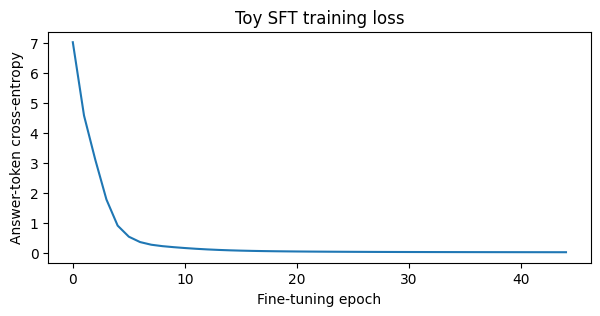
The program saves result-01.png in the working folder. This is output from the shown code, not a separately invented chart.
The displayed output was captured from the supplied default program in a separate folder, with no project-level module on its import path. It is a reproducible demonstration on these examples, not a claim about arbitrary inputs.
Walk through what just happened
1. Build the sequence model
An embedding maps token IDs to vectors. The GRU processes the sequence, and the output layer predicts one score for each vocabulary entry.
2. Shift the targets once
The toy loop supplies input tokens except the last and target tokens except the first. Output at the answer input position therefore predicts the first response token.
3. Mask prompt targets
sft_example marks shifted prompt targets with -100. The prompt remains in the input, but only response and end-token positions contribute to the chosen loss.
4. Generate without teacher forcing
generate appends the model’s own predicted tokens until EOS or a maximum length. Compare these generated strings with the supplied training answers; training-time correct prefixes are no longer handed to it.
Change one thing yourself
Print input IDs and labels for each pair, decode them with the vocabulary, and identify exactly which positions are supervised.
If your result is different
The toy model shifts labels explicitly. The optional Transformers recipe shifts them internally. Copying the same mask index between those APIs without tracing the boundary causes an off-by-one error.
Check the complete imports and filenames first. Then compare your input and command with the shown run. Numeric results may differ slightly between platforms; the program's assertions check the intended relationships rather than relying on a decorative screenshot.
What you can now explain
Pretrain a tiny sequence model and fine-tune it on answer tokens. Next we will build on this result in Part 8.
Technical reference: PyTorch learning basics. This project and its wording are original CodeTips Academy material.


