
Download the matching self-contained notebook · Read the notebook preview
What you will build
Instead of changing the existing network, we can add a small trainable path. Our adapter compresses a 16-number hidden vector to four numbers, expands it back, and adds the correction to the original vector.
The file includes the entire adapter class, source-model setup, and optimizer loop. We initialize the up projection to zero, verify that the starting output matches the base, and check that the frozen base values remain unchanged after training.
By the end: Train a bottleneck adapter and compare its update scope with bias-only tuning.
- What you will build
- What you need before starting
- Understand the idea before the code
- A picture of this part's idea
- Create the lesson folder
- Complete code for this article
- Run it and compare the result
- Walk through what just happened
- Change one thing yourself
- If your result is different
- What you can now explain
What you need before starting
You need basic Python: variables, functions, dictionaries, loops, and imports. When this lesson introduces a class or a library-specific term, its role is explained below.
Use Python 3.12. These examples were executed on Windows with Python 3.12.4. Use the shown interpreter consistently when installing packages and running code. This is an original small CPU teaching experiment, not a downloaded general-purpose LLM.
You do not need to run an earlier article to make this part execute. The complete files and data used here are supplied below. The series order is for learning the ideas progressively.
Understand the idea before the code
Parameter-efficient fine-tuning (PEFT) groups methods that restrict what is updated or add a relatively small trainable component. It is a family of methods, not a single model or loss. Here a base model is the already-trained starting network; “frozen base” means its existing parameters are not updated.
An adapter in this chapter is an added trainable neural module. A bottleneck deliberately compresses an intermediate vector to fewer numbers and expands it again. A projection is the learned linear conversion from one vector width to another. If our hidden vector has width 16, down maps it to 4 numbers and up maps those back to 16.
h + adapter(h) is a residual connection: keep the original hidden vector and add a learned correction of the same shape. relu keeps positive values and replaces negative values with zero. It makes this adapter nonlinear; this is not the same computation as LoRA's linear matrix update in the next part.
Bias-only tuning updates offsets but not weight matrices. A soft prompt is a set of learned numeric input embeddings, not ordinary readable instruction text. An embedding maps an input token to a vector. Prefix tuning uses learned prefix information inside attention processing; it is related to, but different from, adding input embeddings.
A picture of this part's idea
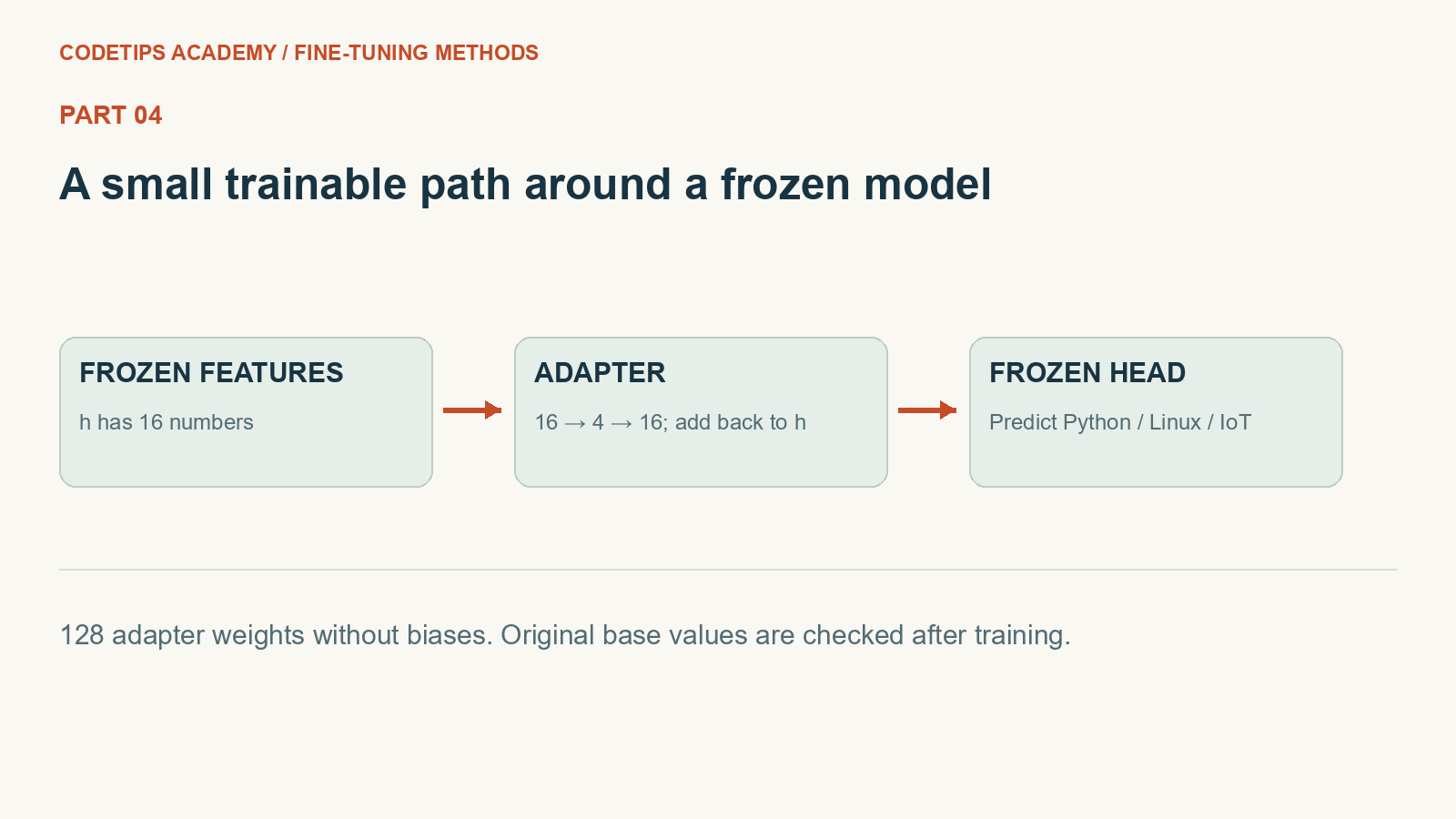
This picture introduces the mechanism. The numbers and assertions in the program below are the actual experiment.
Create the lesson folder
Create this folder and keep the filenames exactly as shown. In particular, a local module is an ordinary file beside the program, not an extra package you must guess how to install.
lesson-folder/
  lesson.py
  requirements.txt
Save requirements.txt
These are the external Python packages for this lesson. The local files above are included in the article; they are not pip packages.
torch==2.2.2
numpy==1.26.4
matplotlib==3.9.1
python -m venv .venv
.venv\Scripts\python.exe -m pip install -r requirements.txt
On Linux/macOS, use python3 -m venv .venv and .venv/bin/python -m pip install -r requirements.txt. Installation requires internet access. The default examples do not call a paid API.
Complete code for this article
Save this complete file as lesson.py
This is the complete program, including imports, data, function definitions, and the entry point.
import copy
import re
import torch
from torch import nn
from torch.nn import functional as F

LABELS = ["python", "linux", "iot"]

GROUPS = [
    ("python", ["python", "list", "dictionary", "function", "script", "package"]),
    ("linux", ["linux", "shell", "permission", "service", "process", "terminal"]),
    ("iot", ["esp32", "camera", "sensor", "gpio", "wifi", "raspberry"]),
]


def seed(value=42):
    torch.manual_seed(value)
    torch.set_num_threads(1)


def records():
    """One group per topic keyword; all paraphrases stay in the same split."""
    rows = []
    for label, words in GROUPS:
        for i, word in enumerate(words):
            split = "train" if i < 4 else "validation" if i == 4 else "test"
            for template in ["help with {}", "please explain {}", "debug my {}"]:
                rows.append(
                    dict(
                        text=template.format(word),
                        label=label,
                        group=f"{label}-{word}",
                        split=split,
                    )
                )
    return rows


def tokens(text):
    return re.findall("[a-z0-9]+", text.lower())


def make_vocab(rows):
    return {
        word: i
        for i, word in enumerate(sorted({w for r in rows for w in tokens(r["text"])}))
    }


def encode(rows, vocab):
    x = torch.zeros(len(rows), len(vocab))
    for i, row in enumerate(rows):
        for word in tokens(row["text"]):
            if word in vocab:
                x[i, vocab[word]] += 1
    return (x, torch.tensor([LABELS.index(r["label"]) for r in rows]))


class Router(nn.Module):
    def __init__(self, width, hidden=16):
        super().__init__()
        self.encoder = nn.Linear(width, hidden)
        self.head = nn.Linear(hidden, 3)

    def forward(self, x):
        return self.head(torch.tanh(self.encoder(x)))


class AdapterRouter(nn.Module):
    def __init__(self, base, rank=4):
        super().__init__()
        self.base = copy.deepcopy(base).requires_grad_(False)
        h = self.base.head.in_features
        self.down = nn.Linear(h, rank, bias=False)
        self.up = nn.Linear(rank, h, bias=False)
        nn.init.zeros_(self.up.weight)

    def forward(self, x):
        h = torch.tanh(self.base.encoder(x))
        return self.base.head(h + self.up(torch.relu(self.down(h))))


def train(model, x, y, steps=100, lr=0.03):
    params = [p for p in model.parameters() if p.requires_grad]
    optimizer = torch.optim.Adam(params, lr=lr)
    losses = []
    model.train()
    for _ in range(steps):
        optimizer.zero_grad(set_to_none=True)
        loss = F.cross_entropy(model(x), y)
        loss.backward()
        optimizer.step()
        losses.append(float(loss.detach()))
    return losses


def prepare():
    """Pretrain on an explicitly separate, synthetic source corpus."""
    seed()
    target = records()
    source = []
    for label, words in GROUPS:
        for word in words:
            source.append(dict(text=f"general guide {word}", label=label))
    vocab = make_vocab(source + [r for r in target if r["split"] == "train"])
    sx, sy = encode(source, vocab)
    base = Router(len(vocab))
    train(base, sx, sy, steps=45, lr=0.02)
    return (base, vocab, target)


def method(base, name):
    model = copy.deepcopy(base)
    for key, p in model.named_parameters():
        p.requires_grad_("bias" in key)
    return model


def counts(model):
    return {
        "trainable": sum((p.numel() for p in model.parameters() if p.requires_grad)),
        "total": sum((p.numel() for p in model.parameters())),
    }


def main():
    import torch

    base, vocab, rows = prepare()
    x, y = encode([r for r in rows if r["split"] == "train"], vocab)
    adapter = AdapterRouter(base, rank=4)
    assert torch.allclose(adapter(x), base(x))
    base_before = {k: v.clone() for k, v in adapter.base.state_dict().items()}
    losses = train(adapter, x, y, steps=100, lr=0.02)
    assert all(
        (torch.equal(v, adapter.base.state_dict()[k]) for k, v in base_before.items())
    )
    print(
        "adapter:",
        counts(adapter),
        "loss:",
        round(losses[0], 4),
        "->",
        round(losses[-1], 4),
    )
    bias_model = method(base, "bitfit")
    print(
        "bias-only:",
        [name for name, p in bias_model.named_parameters() if p.requires_grad],
    )
    train(bias_model, x, y, steps=80, lr=0.01)


if __name__ == "__main__":
    main()
Run it and compare the result
Run commands from the lesson folder. In the commands below, python means the environment you installed into. On Windows, substitute .venv\Scripts\python.exe; on Linux/macOS substitute .venv/bin/python. Do not create the environment with one interpreter and run the lesson with another.
Run 1: python lesson.py
python lesson.py
Captured standard output:
adapter: {'trainable': 128, 'total': 611} loss: 0.0022 -> 0.0
bias-only: ['encoder.bias', 'head.bias']
The displayed output was captured from the supplied default program in a separate folder, with no project-level module on its import path. It is a reproducible demonstration on these examples, not a claim about arbitrary inputs.
Walk through what just happened
1. Preserve the original route
AdapterRouter owns a frozen copy of the base model. The normal encoder and head still produce the original features and scores.
2. Learn the correction
down and up form the bottleneck. ReLU makes the inserted path nonlinear, while the residual addition preserves the original hidden vector.
3. Test freezing rather than assuming it
The assertion compares every stored base tensor after the optimizer loop. Counting trainable values alone would not establish that those tensors stayed fixed.
4. Restrict an alternative
The bias-only model sets requires_grad only for parameter names containing bias. This permits offsets to change while weight matrices stay fixed.
Change one thing yourself
Try bottleneck widths 1, 2, and 8 while keeping the same starting model. Record the added parameter count and validation behavior.
If your result is different
A service-integration adapter is ordinary request/response code. The adapter in this lesson is a trainable neural module; the shared word does not imply the same mechanism.
Check the complete imports and filenames first. Then compare your input and command with the shown run. Numeric results may differ slightly between platforms; the program's assertions check the intended relationships rather than relying on a decorative screenshot.
What you can now explain
Train a bottleneck adapter and compare its update scope with bias-only tuning. Next we will build on this result in Part 5.
Technical reference: PyTorch learning basics. This project and its wording are original CodeTips Academy material.


