Part 2 of 8 · Basic Python is enough · Tested with Python 3.12.4, LangGraph 1.2.16 and SQLite checkpointer 3.1.2.
Build and run a StateGraph, then trace how nodes return changes to a shared dictionary-shaped state.
Keep the task small while learning the graph
In article 1, one Python function cleaned a question and returned a fixed reply. We can do that with plain Python, and we still could. This lesson introduces graph vocabulary using the same small task so you do not have to learn a new business problem at the same time.
By the end, you will run two graph nodes and inspect the state they produced. There is no model, database, account, or API key involved.
Install into an isolated environment
Create a virtual environment in the repository root:
python -m venv .venv
On Windows, call that environment's Python explicitly:
.venv\Scripts\python.exe -m pip install -r requirements-lock.txt
.venv\Scripts\python.exe -m pip install --no-deps -e .
.venv\Scripts\python.exe lessons/02_first_graph/main.py
On Linux or macOS:
.venv/bin/python -m pip install -r requirements-lock.txt
.venv/bin/python -m pip install --no-deps -e .
.venv/bin/python lessons/02_first_graph/main.py
The lock file records the versions used for this edition, including development dependencies. The second command installs our own package in editable mode; --no-deps keeps the already installed locked dependencies. Downloading packages requires internet access once. Running the demo after installation does not require a model service.
For brevity, later examples use python. That means your virtual-environment interpreter: either activate the environment or substitute the explicit path shown above. There is no need to change Windows execution-policy settings just to run these commands.
Three names you need
State is the named data available to workflow steps. Nodes are functions that do work and return updates. Edges specify where execution can go next. START and END mark the entry and exit of this graph. Graph API overview
Here is the complete lesson:
"""Article 2: put the two Python steps into a StateGraph."""
import json
from typing import TypedDict
from langgraph.graph import END, START, StateGraph

class State(TypedDict, total=False):
    text: str
    cleaned: str
    reply: str

def clean(state):
    return {"cleaned": " ".join(state["text"].split())}

def draft(state):
    return {"reply": "Check the environment for this question: " + state["cleaned"]}

def build():
    builder = StateGraph(State)
    builder.add_node("clean", clean)
    builder.add_node("draft", draft)
    builder.add_edge(START, "clean")
    builder.add_edge("clean", "draft")
    builder.add_edge("draft", END)
    return builder.compile()

if __name__ == "__main__":
    print(json.dumps(build().invoke({"text": "  My Python module   is missing.  "}), indent=2))
Generate and explain the graph built by this code
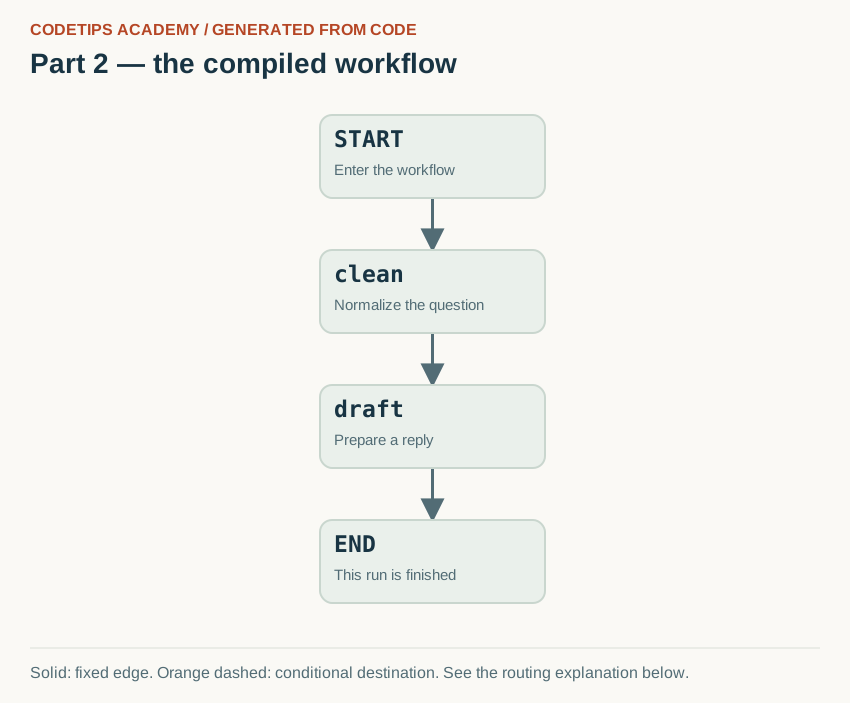
The diagram below is generated from this lesson's compiled get_graph() nodes and edges. Node positions are chosen for readability; the connections come from the Python graph, rather than being copied from a generic illustration.
After installing the project, run this command from its root:
python tools/render_graphs.py --part 2
It writes assets/generated/part-02.svg (the image), .mmd (Mermaid source), and .json (the captured nodes and edges). Rendering is local and does not call a model or a remote image service. If you add nodes, update the layout positions in the renderer as well.

Read the arrows with the code
- START → clean: The initial question enters the clean function. It adds the cleaned field.
- clean → draft: Draft reads cleaned, so this edge puts the data-producing step first.
- draft → END: The reply has been prepared. This graph has no branch, pause, or delivery step.
Solid lines are fixed transitions. Orange dashed lines mark possible conditional destinations; the routing function chooses the destination for a particular run. A node can contain several Python operations that are not separate graph nodes.
Understand the state schema
State inherits from TypedDict. It describes the keys and value types we intend to use in a dictionary. text, cleaned, and reply are strings. total=False allows some keys to be absent: we begin with text, then later nodes create the other values.
A type hint is not a promise that Python will validate every value at runtime. If a caller passes a list where your function expects text, the annotation does not magically turn it into a string. The final application checks its external inputs explicitly. Here, the fixed example keeps the input simple while we learn the flow.
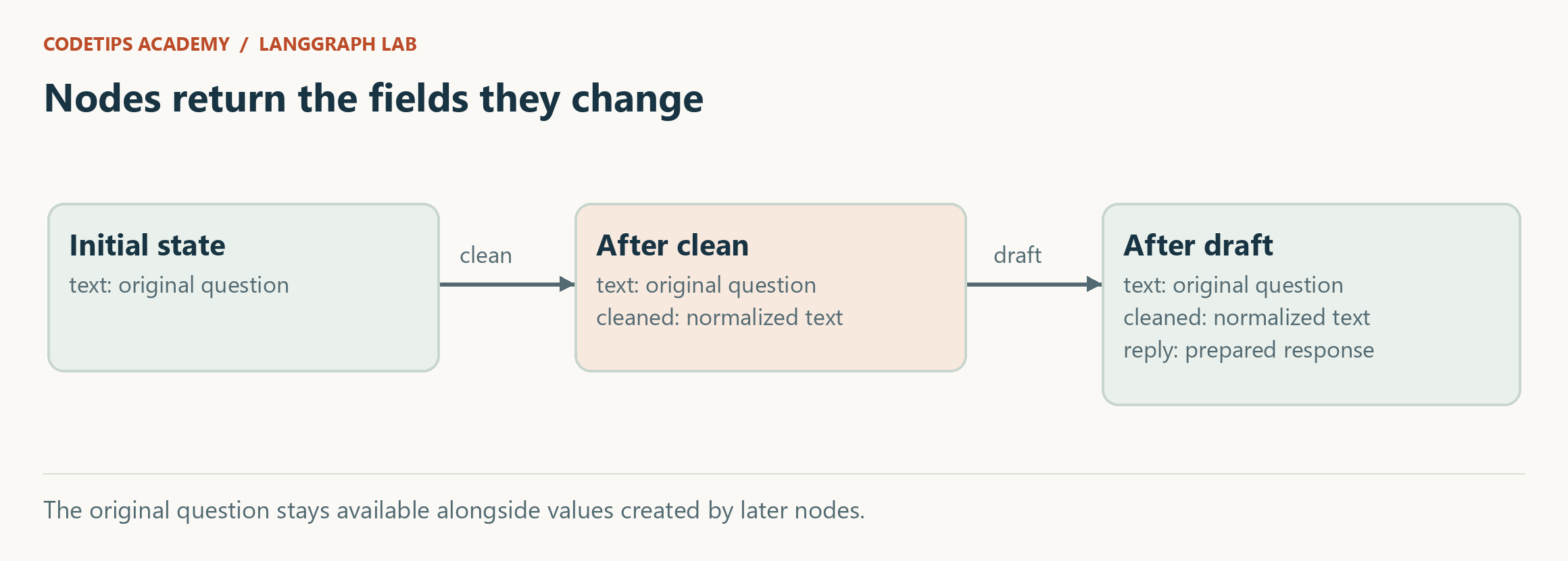
Notice that clean returns only {"cleaned": ...}. It does not return the entire incoming state. draft returns only {"reply": ...}. Each node states what changed. That makes its responsibility easier to inspect than a function that mutates several unrelated fields in place.
Read the builder as a map
The two add_node calls register functions under names. The name "clean" identifies a graph node; the Python function clean supplies its behavior. The names happen to match because that is easy to read, but they serve different roles.
The three edges establish one path. Entry goes to clean, cleaning goes to draft, and drafting goes to the end. Compiling gives us the runnable graph. Invoking it supplies the initial state and waits for a result.
There are no branches yet. If you can read clean -> draft, you can explain the whole execution. Adding a graph did not make the reply more intelligent. It made the sequence explicit in a form we can extend.
Trace the result yourself
For the supplied question, the final values are:
{
  "text": "  My Python module   is missing.  ",
  "cleaned": "My Python module is missing.",
  "reply": "Check the environment for this question: My Python module is missing."
}
The original text remains unchanged. The cleaned field records a derived value, and reply uses that derived value. Preserving both can be useful when investigating exactly what normalization changed.
Follow the access in draft: state["cleaned"]. That field is available because our edges require clean to run first. If you connect entry straight to draft, you have changed the data dependency. The field would not exist in the initial dictionary, and the function would fail.
Graph construction therefore describes more than visual ordering. It also establishes when a function's required inputs should be available.
Common mistakes
If langgraph cannot be imported, check python -m pip --version and the interpreter path. Installing with one Python and executing with another is a common environment problem. Use the explicit virtual-environment path to remove the ambiguity.
If a node raises a missing-key error, identify the node that should have created the key, then inspect the edge leading to the failing node. Do not fix it by filling every field with meaningless defaults; that can hide an incorrectly ordered graph.
If your reply still contains unexpected whitespace, confirm that you used state["cleaned"], not state["text"]. The graph cannot infer which of two valid fields your business logic intended to use.
Practice
Add a node called count that creates a character_count integer from cleaned. Update the schema and change the edges to clean -> count -> draft. Predict the final dictionary before running the program.
Then move count after draft. Does the count change? Explain why both positions are valid for this particular function. Contrast that with moving draft before clean.
In article 3, we will replace the single path with a decision: technical questions proceed toward documentation, while billing and unknown questions go to a person.
This is an educational project using fictional workshop notes and synthetic tickets. It does not access the real CodeTips Academy website or send email. Downloadable code is provided above. GitHub source links will be added after the repository is published.